

CarsArrive Load Alerts for Car Haulers
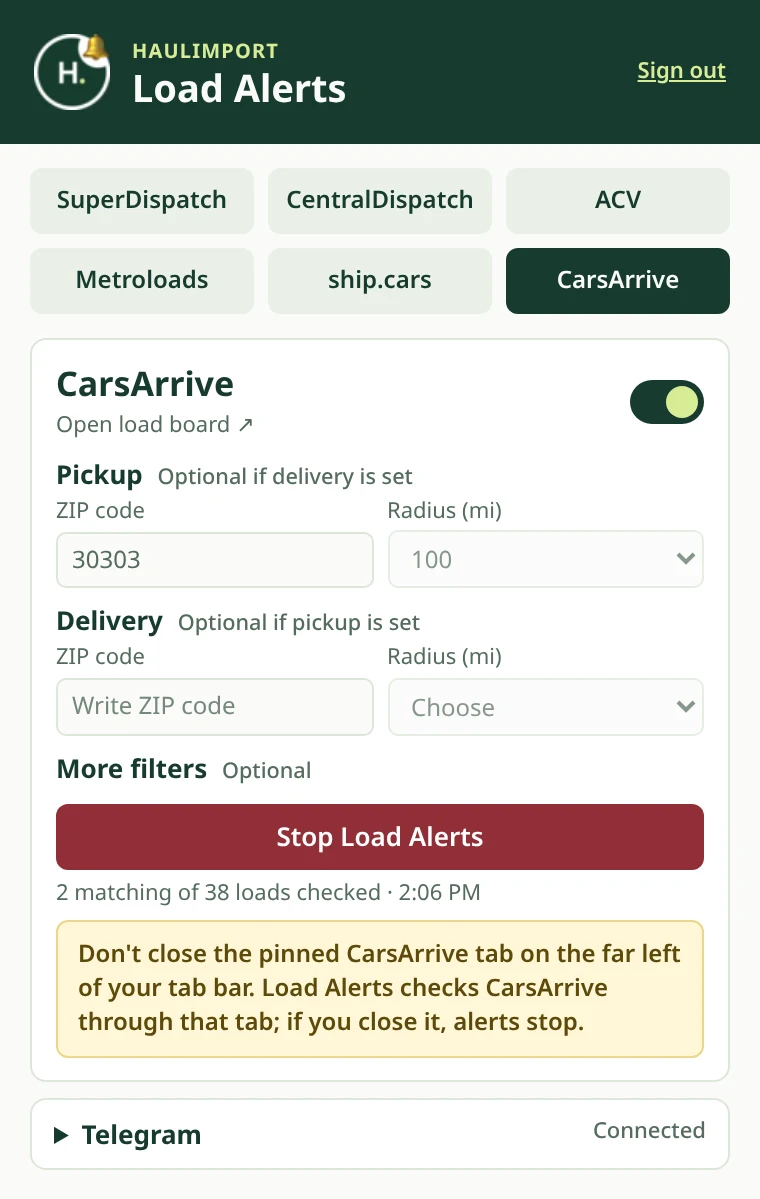
CarsArrive searches by city, which makes quick lane checks tedious. With Haulimport you type a ZIP code once; the extension turns it into the CarsArrive city search, repeats it about once a minute, and sends new matching loads to Telegram.
ZIP in, city search out
Haulimport looks up the city for your ZIP code and fills the CarsArrive search form the way the site expects.
CarsArrive radius choices
Choose 50, 100 or 200 miles — the same radius options CarsArrive itself offers.
Careful sign-in handling
Alerts pause for sign-in only when CarsArrive really shows its sign-in form, so a slow page does not stop your alerts.
CarsArrive lane filters
Pickup and/or delivery ZIP with a 50, 100 or 200 mile radius. CarsArrive does not use the car count or price filters. You stay signed in to the board in your own Chrome browser. Haulimport never asks for or stores your board password. Compare every board in our load board comparison.
How CarsArrive monitoring works
- STEP 1
Create your account and add the extension
Register a Load Alerts account, install the Haulimport Chrome extension and sign in with your emailed code.
- STEP 2
Connect Telegram
Link your Telegram chat once from your Haulimport dashboard. That is where alerts arrive.
- STEP 3
Set your lane and turn boards on
Enter a pickup ZIP, a delivery ZIP or both, choose a radius, and switch on the boards you use.
- STEP 4
Start Load Alerts
Each board runs in one pinned tab and is checked about once a minute. New matching loads go to Telegram.
CarsArrive alerts in Telegram
New CarsArrive loads arrive in your linked Telegram chat with the lane (city and state), vehicles and price shown on the board. Alerts are sent once per load, and reposts of loads you already received are skipped. Read more about Telegram load notifications.
CarsArrive load alerts, answered.
Why do I enter a ZIP when CarsArrive uses cities?
It is faster. Haulimport converts the ZIP into the matching city for the CarsArrive search for you.
Which radius options are available?
50, 100 or 200 miles, matching CarsArrive.
What happens if I am signed out of CarsArrive?
The extension shows a sign-in warning so you can sign in again; alerts resume after that.
Is Haulimport connected to CarsArrive?
No. Haulimport is an independent service and not affiliated with or endorsed by CarsArrive.
Learn more about load alerts
How Auto Transport Load Board Monitoring Works
One monitoring cycle step by step, how board limits are respected, and what can pause your alerts.
Read the guideCOMPARISONAutomated vs Manual Load Searching for Car Haulers
Side by side: refreshing boards by hand versus automated alerts, and when manual search still wins.
Read the guideBOARD COMPARISONComparing the Six Load Boards Haulimport Supports
Radius options, filters and Telegram alert contents for each of the six supported boards.
Read the guideMonitor your other load boards too
Load Alerts covers six boards in one extension. Read the full auto transport load alerts overview, see how Haulimport works, or go back to the Haulimport home page.

Central Dispatch
Watch your Central Dispatch lanes and get new matching loads with broker name and phone in Telegram.
Central Dispatch load alerts Super DispatchSuper Dispatch
Get new Super Dispatch loads on your lanes in Telegram, with the real order number and broker phone.
Super Dispatch load monitoring
Ship.Cars
Monitor Ship.Cars with 25 to 200 mile radius searches and receive new loads with broker contact.
Ship.Cars load alerts
ACV
Catch new ACV Transport loads near your lane and get a clean Telegram alert for each one.
ACV auto transport monitoring
MetroLoads (Acertus)
Monitor the MetroLoads (Acertus) load board and get new loads near your lane in Telegram.
MetroLoads Acertus alertsHaulimport is an independent service and is not affiliated with or endorsed by CarsArrive.
Get CarsArrive loads before they are gone.
Load Alerts is $9.99/month with a 3-day free trial. See all Haulimport pricing.