
Telegram Notifications for Auto Transport Dispatchers
Haulimport sends load alerts through Telegram, a free messaging app for phone and desktop. The boards run in Chrome on your computer; the alerts reach you wherever you are.
By the Haulimport team · Updated
Why Telegram
Telegram works on phones and computers, and its bots can send messages the moment something happens. That lets you leave the boards running on one computer and still see new loads from your phone.
Connecting Telegram to Haulimport
- Sign in to your Haulimport dashboard and connect Telegram there (not in the extension).
- Open the Load Alerts extension: the Telegram section shows Connected.
- Press Send test alert to confirm messages arrive.
To protect accounts, each Haulimport account can connect Telegram at most twice in any 24 hours.
What each alert contains
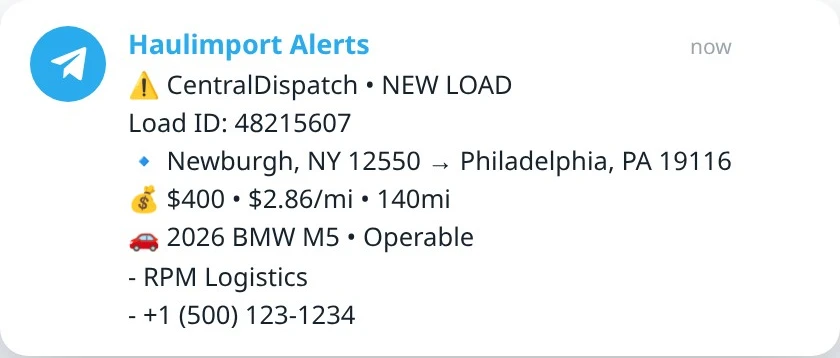
- The board name and NEW LOAD, plus the load ID (the order number on Super Dispatch).
- Pickup and delivery locations.
- Price, $ per mile and miles when the board lists them.
- Vehicles, with Operable or Inoperable where the board provides it (trailer type on CarsArrive).
- Broker name and phone on Central Dispatch, Super Dispatch and Ship.Cars. ACV alerts have no broker lines.
Tips for dispatch teams
- Give the Haulimport chat its own notification sound in Telegram so load alerts stand out.
- Pin the chat so it stays at the top.
- Each person needs their own Load Alerts account; one account works on one computer at a time.