
Central Dispatch Alert Bots Explained
Ask a group of dispatchers about Central Dispatch and someone will mention an alert bot. The term covers several kinds of tools. This guide explains what they are, what to check before trusting one, and how Haulimport does it. Haulimport is not affiliated with Central Dispatch.
By the Haulimport team · Updated
What a Central Dispatch alert bot is
An alert bot is any program that keeps checking Central Dispatch for new loads and notifies you. It can be a browser extension, a script on your computer, or a hosted service that runs on someone else’s server.
What to check before you trust one
- Where it signs in. A hosted service has to hold your login; a browser extension can use the session you already have.
- How often it checks and how many pages it reads each time.
- What each alert contains — is the broker phone included?
- Where alerts are delivered.
- Who keeps it working when the board changes its pages.
How Haulimport handles Central Dispatch
- Runs in your own Chrome and reuses the search your signed-in Central Dispatch page makes. Your password is never asked for or stored.
- Checks about once a minute and reads up to 8 result pages (400 loads) per check.
- Filters: pickup ZIP, delivery ZIP or both with a radius, plus optional car count, minimum price, minimum $ per mile and condition.
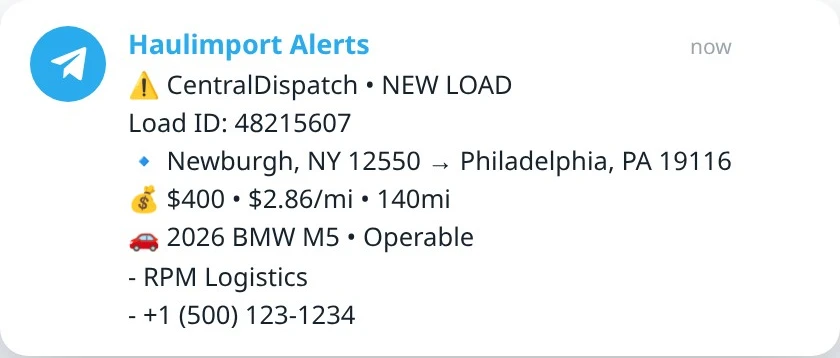
- Telegram alerts include load ID, lane, price, $ per mile, miles, vehicles, Operable or Inoperable, and the broker name and phone.
Setting up Central Dispatch alerts
- Create a Haulimport individual account and install the Load Alerts Chrome extension.
- Connect Telegram from your Haulimport dashboard.
- Sign in to Central Dispatch in Chrome as usual.
- Open the extension, choose Central Dispatch, enter your lane and press Start Load Alerts.