
Auto Transport Load Alerts Across Six Major Load Boards
Haulimport Load Alerts watches Central Dispatch, Super Dispatch, CarsArrive, Ship.Cars, ACV and MetroLoads (Acertus) for the lanes you care about, and sends every new matching load to your Telegram. One extension, one set of lanes, one chat.
Choose the boards you already use

Central Dispatch
Watch your Central Dispatch lanes and get new matching loads with broker name and phone in Telegram.
Central Dispatch load alerts Super DispatchSuper Dispatch
Get new Super Dispatch loads on your lanes in Telegram, with the real order number and broker phone.
Super Dispatch load monitoring
CarsArrive
Turn a ZIP code into a CarsArrive city search and get new matching loads in Telegram.
CarsArrive notifications
Ship.Cars
Monitor Ship.Cars with 25 to 200 mile radius searches and receive new loads with broker contact.
Ship.Cars load alerts
ACV
Catch new ACV Transport loads near your lane and get a clean Telegram alert for each one.
ACV auto transport monitoring
MetroLoads (Acertus)
Monitor the MetroLoads (Acertus) load board and get new loads near your lane in Telegram.
MetroLoads Acertus alertsOne place for every board
Stop rotating between six browser tabs. Each enabled board runs in its own pinned tab and reports new loads to the same Telegram chat.
Only new, matching loads
Set a pickup ZIP, delivery ZIP or both with a radius. Loads are sent once; reposts you already received are skipped.
Telegram notifications
Link Telegram once in your dashboard. Alerts show the lane, vehicles and price, plus broker name and phone on Central Dispatch, Super Dispatch and Ship.Cars.
From install to first alert
- STEP 1
Create your account and add the extension
Register a Load Alerts account, install the Haulimport Chrome extension and sign in with your emailed code.
- STEP 2
Connect Telegram
Link your Telegram chat once from your Haulimport dashboard. That is where alerts arrive.
- STEP 3
Set your lane and turn boards on
Enter a pickup ZIP, a delivery ZIP or both, choose a radius, and switch on the boards you use.
- STEP 4
Start Load Alerts
Each board runs in one pinned tab and is checked about once a minute. New matching loads go to Telegram.
For dispatchers
Cover more boards for your carriers without refreshing all day. Hear about a load the minute it posts and spend your time calling brokers instead of searching.
For carriers and car haulers
Set a lane near your next drop-off and let alerts find the backhaul. Turn on just the boards you are signed up for.
See Haulimport in action
Screenshots of the real Haulimport interface, shown with sample lanes and loads.
1. Choose a board and set your lane
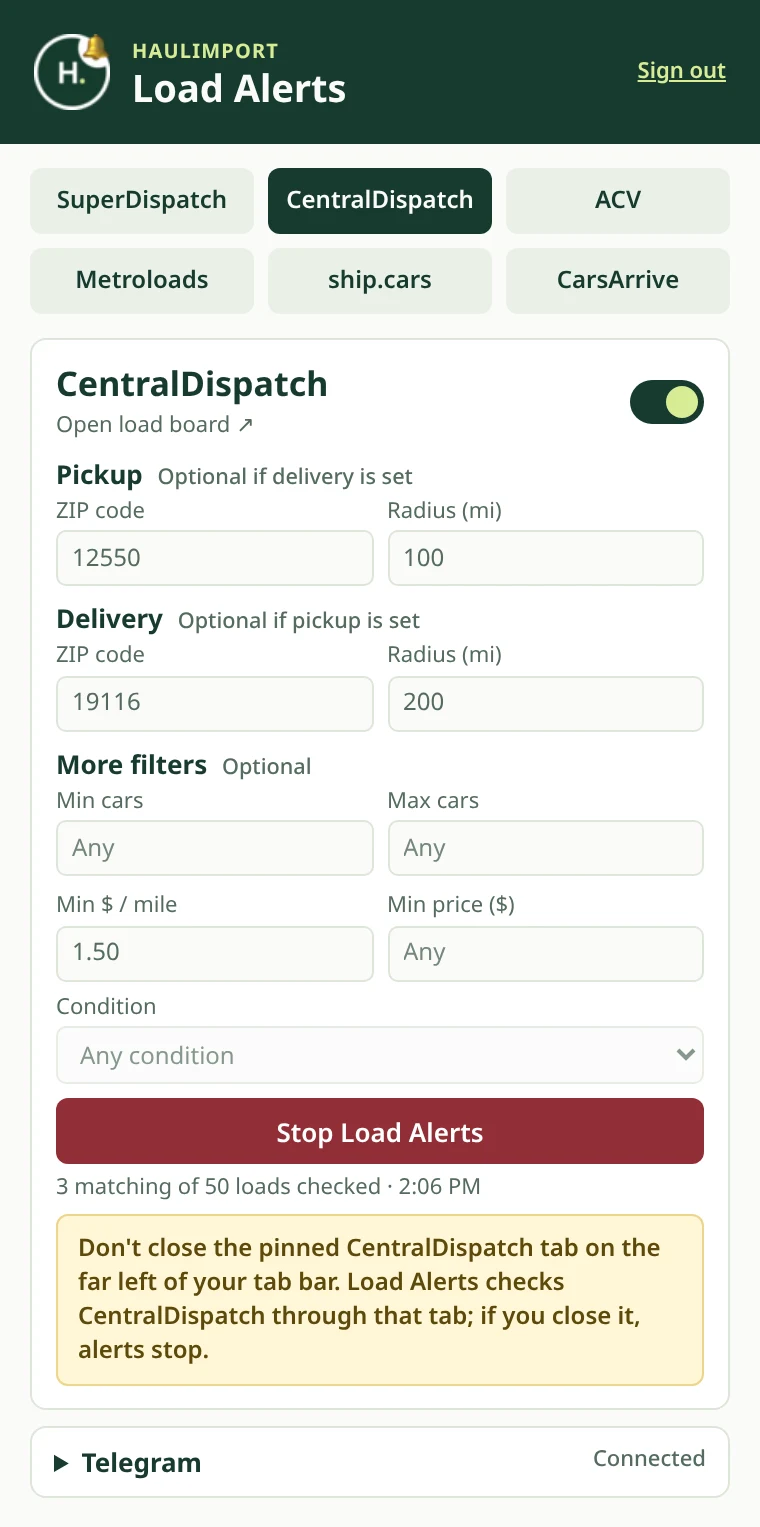
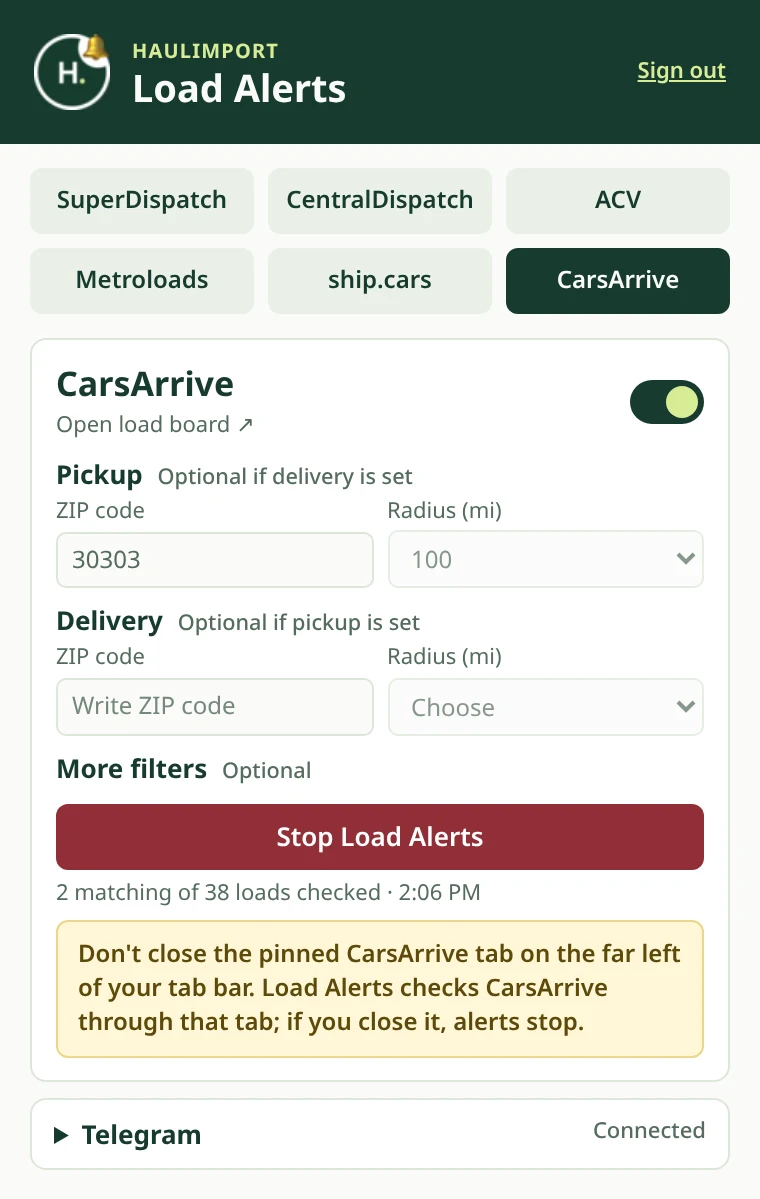
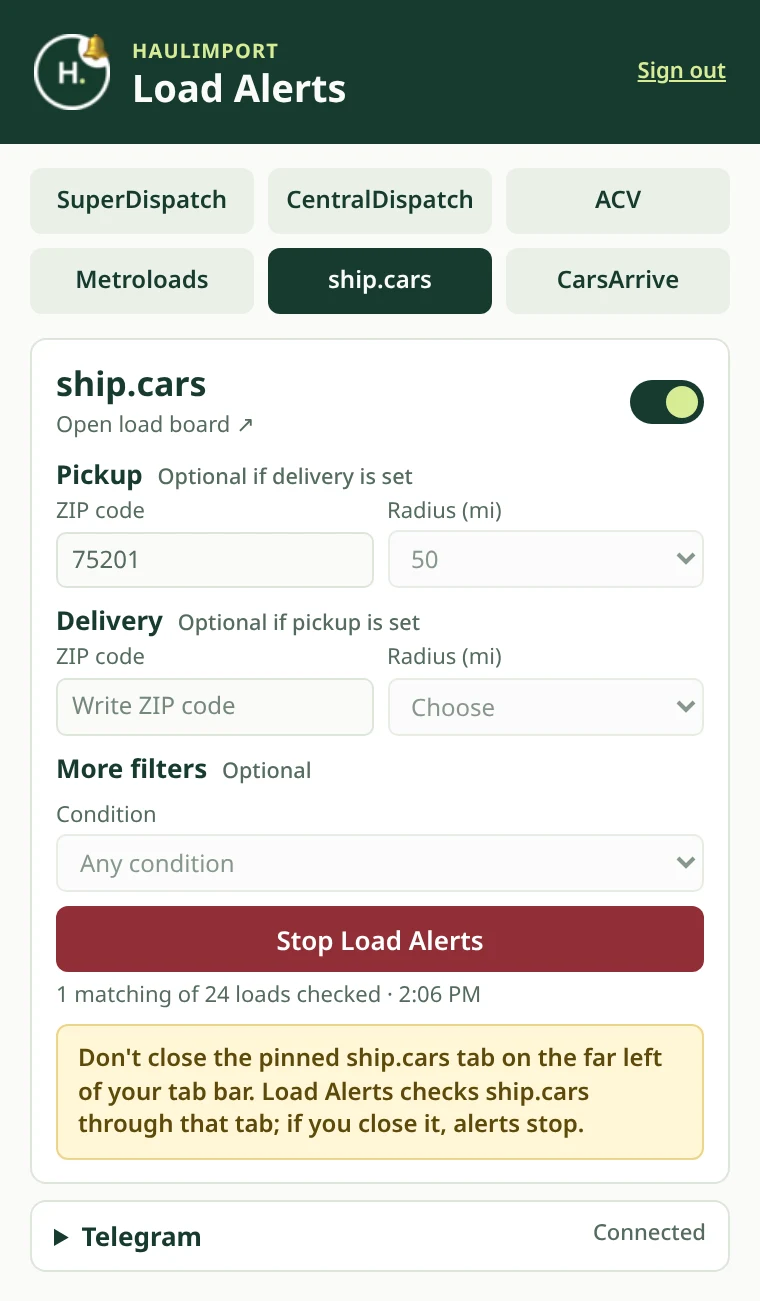
The Load Alerts extension has a Route 1 / Route 2 switch, so you can watch two lanes at once, and a tab for each of the six boards. In each route, enter a pickup ZIP, a delivery ZIP or both with a radius, then press Start Load Alerts. Each board keeps its own filters, and boards with fixed radius choices show a list instead of a number box.
2. Get each new load in Telegram
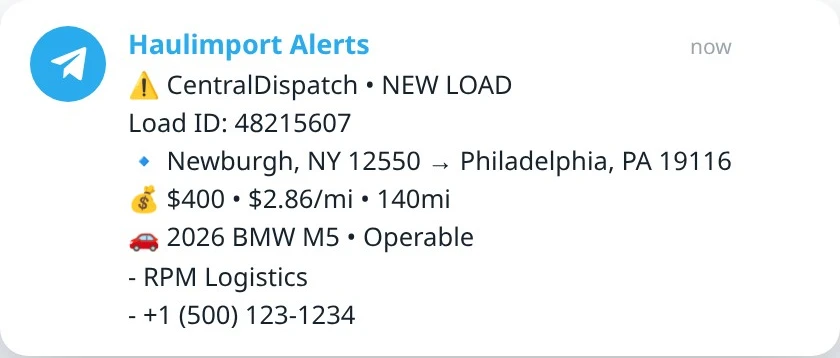
Connect Telegram once from your Haulimport dashboard. Each new matching load arrives as one message with the board, load ID, lane, price, $ per mile, miles and vehicles — plus broker name and phone on Central Dispatch, Super Dispatch and Ship.Cars.
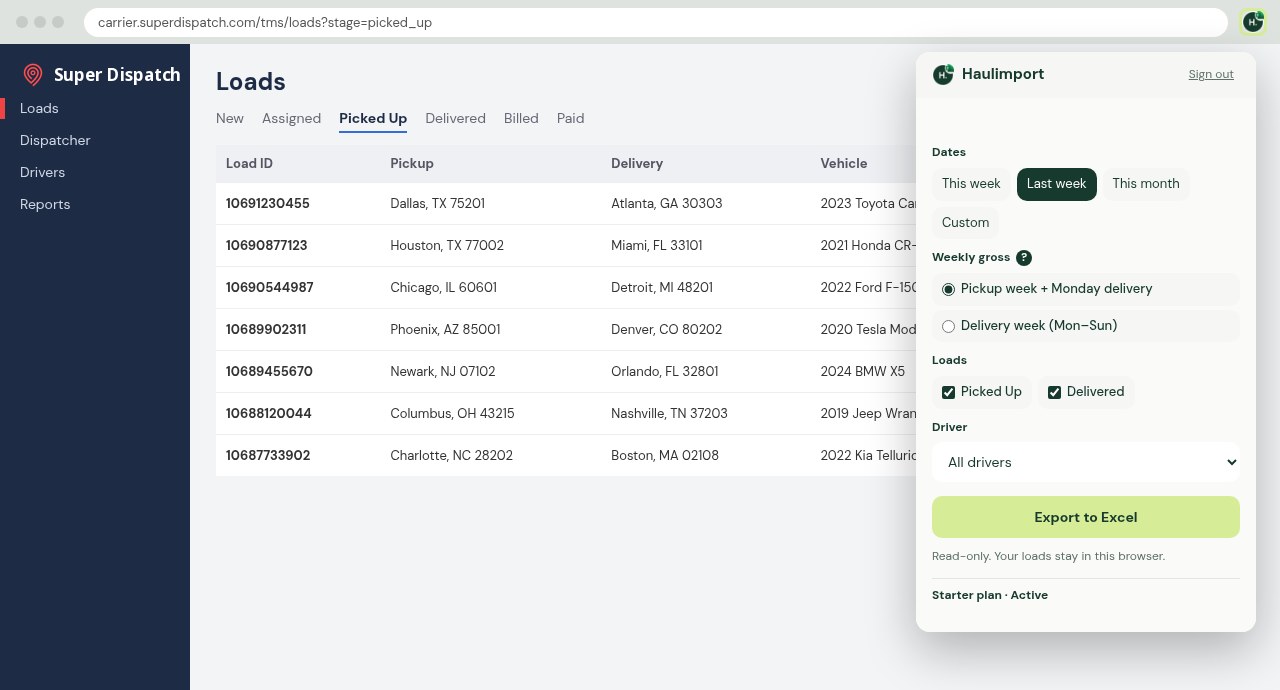
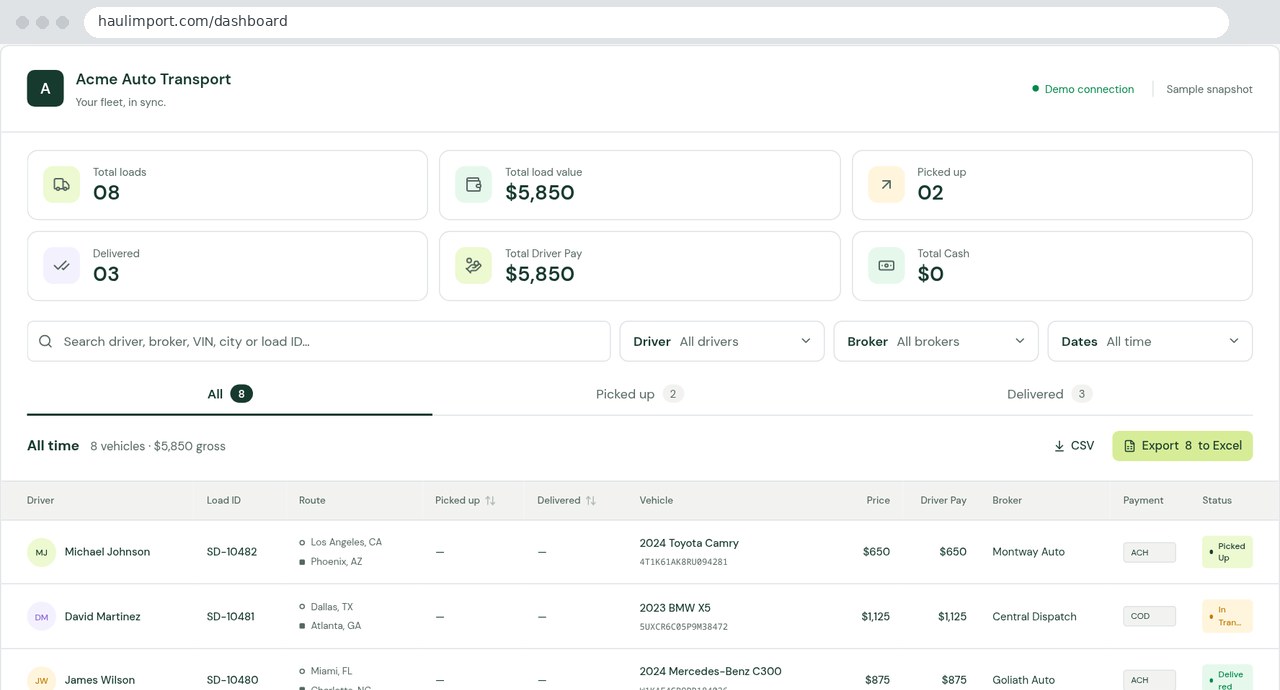
3. For carrier companies: Super Dispatch to Excel
The Excel Extension exports your Super Dispatch loads in one click. The Excel Dashboard imports Picked Up and Delivered loads automatically, with Excel and CSV exports.
Auto transport load alerts, answered.
What is Haulimport Load Alerts?
A Chrome extension and web account for car haulers and dispatchers. It monitors the load boards you use and sends new loads that match your lanes to Telegram.
Which load boards are supported?
Six: Central Dispatch, Super Dispatch, CarsArrive, Ship.Cars, ACV and MetroLoads (Acertus). Each one can be switched on or off.
Do I need accounts on the load boards?
Yes. You use your own board access and stay signed in to each board in Chrome. Haulimport never asks for or stores your board passwords.
How often are boards checked?
About once a minute per enabled board while Chrome is open and alerts are running.
Can I use it on more than one computer?
Load Alerts runs on one active computer per account. Signing in on a new computer moves alerts there.
Is Haulimport endorsed by these load boards?
No. Haulimport is an independent service and is not affiliated with or endorsed by any of the supported load boards.
Guides for car haulers and dispatchers
Auto Transport Load Alert Software: What It Does and How to Choose
The questions to ask any load alert tool, and Haulimport’s honest answers — including what it does not do.
Read the guideHOW IT WORKSHow Auto Transport Load Board Monitoring Works
One monitoring cycle step by step, how board limits are respected, and what can pause your alerts.
Read the guideCENTRAL DISPATCHCentral Dispatch Alert Bots Explained
What a Central Dispatch alert bot is, what to check first, and how Haulimport handles Central Dispatch.
Read the guideCOMPARISONAutomated vs Manual Load Searching for Car Haulers
Side by side: refreshing boards by hand versus automated alerts, and when manual search still wins.
Read the guideBOARD COMPARISONComparing the Six Load Boards Haulimport Supports
Radius options, filters and Telegram alert contents for each of the six supported boards.
Read the guideTELEGRAM ALERTSTelegram Notifications for Auto Transport Dispatchers
Connecting Telegram, what every alert contains, and tips for dispatch teams.
Read the guideRead how Haulimport works, our security FAQ, about Haulimport, or return to the Haulimport home page.
Never miss another load on your lane.
Load Alerts is $9.99/month with a 3-day free trial. See all Haulimport pricing.